



| |
|
|
AVDManage is a Virtual Desktop image management solution for pooled Azure Virtual Desktop Session Hosts that leverages Azure Virtual Machine Scale Sets to deploy, update or rollback a common Master Image to multiple Virtual Machines.
Azure Virtual Desktop Sessions Hosts may be deployed from Generalized or Specialized images.
Scale Sets may be deployed in Uniform or Flexible Orchestration Modes.
Virtual Machine instances can optionally join Active Directory, join Entra ID, join Intune, and join an AVD Host Pool during deployment.
When updating Virtual Machine instances with a new Master Image, Virtual Machine instances retain their ComputerName, Active Directory Identity, Azure Entra ID (Hybrid Joined or Joined), Intune / MDM Device ID and AVD Session Host object.
|
Standardise and Simplify Azure Virtual Desktop Master Image Management
Deploy AVD Session Host Master Image updates
Consistent repeatable lifecycle for Master Image Continuity
Maintain machine identities when updating the Scale Set Master Image
Schedule out of hours updates |
|
|
- Create Virtual Machines
 , Snapshots , Snapshots  & Master Images & Master Images 
- Automatic Snapshot and Image versioning
- Create Uniform and Flexible Virtual Machine Scale Sets
 for Azure Virtual Desktop Host Pools for Azure Virtual Desktop Host Pools
- Deploy Virtual Machines with Persistent or Ephemeral disks
- Deploy, Re-Deploy, Re-Image, Update & Rollback Virtual Machine Scale Sets using Managed Images, Azure Gallery Images or Compute Gallery Images (Generalized or Specialized)
- Virtual Machine instances retain their identity when updating, re-imaging, re-deploying
- Scale Up / Down – Change Virtual Machine Size
- Scale In / Out – Adjust Virtual Machine Scale Set VM instances
- Delete AVD Session Hosts when deleting VM instances
- Delete Active Directory Computer objects and DNS records when deleting VM instances
- Delete Entra Hybrid Joined and Entra Joined Devices when deleting VM instances
- AVD-Turbo - Join Active Directory Domain or Entra ID
 , Join Intune , Join Intune  , Join AVD Host Pool , Join AVD Host Pool  during deployment / update during deployment / update
- AVD-Automate – Schedule tasks for planned maintenance (Updates, Scaling, Power management)
- Supports native AVD Power Management Autoscaling (Flexible Scale Sets)
- Single Master Image Site Availability and Disaster Recovery
- Managed Identities and Secretless Authentication enhance operational security
|
Rapidly deploy AVD Session Host Scale Set VM instances from Specialized Images with AVD-Turbo

|
Editions
AVDManage is available in two editions, Free and Plus.
AVDManage Plus enables deployment of images from Azure Compute Galleries. This allows for deployment of generalized and specialized images, and enables Trusted Launch for Azure Virtual Machines.
VMs and scale sets created from specialized images can be up and running quicker, because they're created from a source that has already been through first boot. VMs created from specialized images boot faster and can contain a greater degree of local customisation as they have not been sysprepped.
AVDManage Plus requires an evaluation or annual license. (Fixed annual fee. Not based on number of users or devices.) Please contact info@chawn.com for license enquiries.
| Features |
Free |
Plus |
| Create Virtual Machines from Snapshots |
|
|
| Create Virtual Machines & Scale Sets from Azure Gallery |
|
|
| Create Virtual Machines & Scale Sets from Managed Images |
|
|
| Create Virtual Machines & Scale Sets from Compute Galleries |
|
|
| Create Virtual Machines in any Resource Group in the base Location |
|
|
| Deploy Generalized Windows Images |
|
|
| Deploy Specialized Windows Images |
|
|
| Persistent & Ephemeral Disks |
|
|
| Accelerated Networking |
|
|
| NVMe Disks |
|
|
| Create Trusted Launch Virtual Machines & Scale Sets |
|
|
| AVD-Automate - Schedule tasks for planned maintenance |
|
|
| Supports AVD Power Management Autoscaling (Flexible Scale Sets) |
|
|
| AVD-Turbo – Join Active Directory Domain or Entra ID, Join Intune, Join AVD Host Pool |
|
|
| Delete AVD Session Hosts when deleting VM Scale Set Instances |
|
|
| Delete Entra Joined Devices when deleting VM Scale Set Instances |
|
|
| Delete Entra Hybrid Joined Devices when deleting VM Scale Set Instances |
|
|
| Delete Active Directory Computer objects and DNS records when deleting VM Scale Set Instances |
|
|
| Site Availability and Disaster Recovery |
|
|
| AVD-Prep – Pre-stage the Remote Desktop Infrastructure and Boot Loader Agents |
|
|
|
Quick Start - AVDManage (Free)
Create a Master Virtual Machine
- Add / Remove required Applications and Features
- Remove unwanted Microsoft Store Apps
- Install required Language Packs
- Install all available Windows and Application updates
- Configure the Default User Profile
- Disable unnecessary Scheduled Tasks
- Disable unnecessary Services
- Enable required Services (Windows Search)
- Enable Firewall Rules (Domain Profile)
- Delete Temporary Files and Source Media on the OS Disk
- Delete Ghost Hardware
- Apply known optimizations
Master Image initial configuration and regular updates
Master Image Optimisation
Install VDIWarmUp
AVD-Prep - Reduce AVD Session Host Image Deployment times
|
|
|
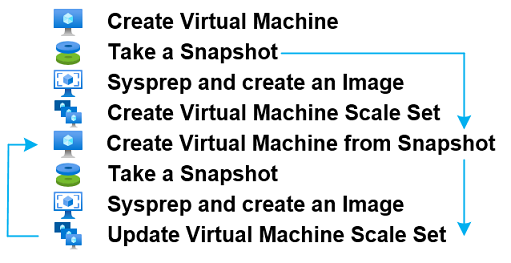
Snapshot the Master Virtual Machine
Shutdown and take a snapshot of the Master Virtual Machine. The snapshot will be used to re-create the Master Virtual Machine during the next update cycle.
|
|
|
Sysprep the Master Virtual Machine
Start the Master Virtual Machine and run Sysprep.
Run
C:\Windows\System32\Sysprep\sysprep.exe /oobe /generalize /shutdown
Master Image Finalisation and Sysprep
|
|
|
Create a Master Image
Create a Master Image from the Master Virtual Machine.
The Master Virtual Machine can be deleted after the Master Image is created.
|
|
|
Create a Virtual Machine Scale Set
Create a Virtual machine Scale Set using the Master Image.
The OS Disk may be Persistent or Ephemeral.
Configure the Virtual Network and Subnet.
Name the Scale Set.
Configure a VM Name prefix and Local Administrator credentials.
Configure Active Directory parameters and credentials.
Credentials are stored in ProtectedSettings. ProtectedSettings are encrypted through a key known only to Azure and the Virtual Machine.
or select Join Entra ID.
Scale Set VM instances will join the AVD Host Pool using Secretless Authentication. |
|
|
Update a Virtual Machine Scale Set
Re-Create the Master Virtual Machine from the last snapshot.
Perform required updates and changes.
Create a new snapshot of the Master Virtual Machine for the next update cycle.
Sysprep the Master Virtual Machine. |
|
|
| Create an updated Master Image |
|
|
Modify the Scale Set configuration by updating the VM Source attribute
Virtual Machine instances may be updated on-demand or the update may be scheduled using AVD-Automate.
After updating, the Virtual machine instances will be running the updated Master Image. They will retain their Active Directory computername, Entra ID device identity (sync via Entra Connect), and Azure Virtual Desktop Session Host name. |

|
| Generalized vs Specialized
The following logs demonstrate deployment duration when deploying Generalized or Specialized Images. In both cases, the Microsoft Remote Desktop Agents have been pre-staged using AVD-Prep to reduce deployment time. |
Generalized - 6m13s
AVD-Turbo joins the VM to the AD Domain and the AVD Host Pool |
Specialized - 3m48s
AVD-Turbo renames the VM, joins the VM to the AD Domain and the AVD Host Pool |
| Event |
Duration |
| Job Start |
00:00:00 |
| First System Startup (12) |
00:00:36 |
| RDAgent Start |
00:04:09 |
| Join Domain |
00:04:25 |
| AVD-Turbo End |
00:05:34 |
| Job End |
00:06:13 |
|
| Event |
Duration |
| Job Start |
00:00:00 |
| First System Startup (12) |
00:00:37 |
| RDAgent Start |
00:01:24 |
|
00:02:27 |
| AVD-Turbo End |
00:03:34 |
| Job End |
00:03:48 |
|
|
|
|
|
|
|